
Fast capture
Write down a thought, task, or idea immediately, without going through a long form.
FlowList is a lightweight Android app for tasks, routines, and goals. Capture a thought immediately, organize it later, and see progress without a heavy planning system.
What it is
FlowList does not demand a complete plan in the first second. First you capture, then you add a due date, recurrence, steps, tags, and a goal.
Fill in details later
Application data is stored only on the user's device.
Write down a thought, task, or idea immediately, without going through a long form.
Break bigger things into short steps, mark progress, and return to details when needed.
Set repeating work: every few days, weeks, months, or up to a chosen number of completions.
Connect tasks with goals and see whether you are actually moving toward the result you want to finish.
Find active and completed items by type, tag, goal, or plain search.
The app stores data locally, supports export and import, and works without a required account.
Access
The public website is informational. Install the Android app from Google Play and keep tasks, routines, goals, and exports on your device.
The Android version is the published app. The website stays informational and the browser build remains separate from the public site.
FAQ
A short note on local data, local builds, and the Android channel.
Yes. FlowList is available as an Android app on Google Play. The public website does not host the browser app.
No. FlowList is designed as a local-first app, so basic use does not require logging in or creating an account.
Yes. FlowList stores data locally in the local browser build or Android app. Key parts of the app can work without a constant internet connection.
FlowList starts with quick capture and lets you clarify later. That makes it useful for tasks and ideas that can become routines and goals over time.
Google Play is the Android distribution channel for FlowList. You can install the published app from the Google Play button on this page.
Tasks, goals, tags, and settings are saved locally on the user's device using IndexedDB. FlowList does not require an account and does not send this data to an external backend.
Voluntary support
If FlowList helps you capture tasks and return to them at the right moment, you can add a voluntary contribution.
Due dates are optional, and routines can run in a rhythm of days, weeks, or months.
The interface is prepared for a quick phone flow: add, clarify, complete.
FAQ and information sections explain local storage, technologies, and how the app works.
Information
This panel explains the basic app concepts: tasks, steps, goals, tags, view types, recurrence, and import/export settings.
A task is something to do or an idea saved for later. You can add a due date, time, steps, tags, and a linked goal.
A due date moves a task into overdue or dated views. Time is optional, so a task can have only a day or no date at all.
A recurring task returns from the selected date every chosen number of days, weeks, months, or years.
The Completed field shows how many cycles are done. Max defines the total repeat limit; an empty Max means an open-ended cycle.
A goal groups tasks around an outcome, while a tag is a colored label for filtering by context, such as work, home, or health.
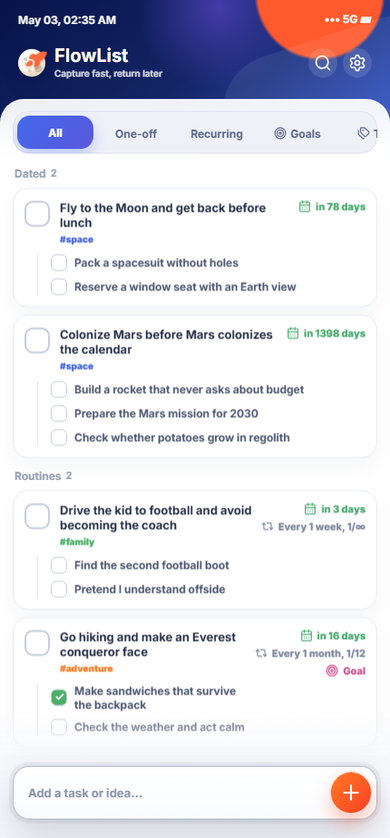
View types are filters: All, One-off, Recurring, Goals, and Tags. Settings also let you export or import JSON.
The simplest start: type a task into quick add and open it for editing later. You do not need to set a date, goal, or tags immediately.
A one-off task ends after being marked complete. A recurring task, if it has not reached its Max limit, stays active and shows the next due date from its rhythm.
Read recurrence like a sentence: every 1 week, every 2 months, or every 1 year. A 3/12 counter means 3 cycles are complete out of 12 planned; 3/∞ means there is no final limit.
Goals measure a larger intention. Tags are looser: use them for areas like work, home, health, or urgent.
JSON export saves a data copy to a file. JSON import replaces the current content with file data, while the current theme and language stay local.
Sample JSON data is ready to test. Download the sample data file, then open Settings in the app and choose Import JSON.
The current FlowList version works without an account or contact form. The public website can load Google Analytics 4 only after user consent; task data remains local.
Tasks, goals, tags, history, theme, and app language are stored locally in IndexedDB on the user's device.
The website has separate language versions: English at the root address and Polish at /pl/.
The browser can save technical files needed for faster loading and offline use.
Google Analytics 4 on the information website loads only after acceptance. If consent is declined, we do not store GA cookies.
Data saved in FlowList stays in the browser or app on the user's device. JSON export creates a local data copy, and JSON import loads the selected file into the local database.
The user can remove app data in FlowList settings with the “Clear saved data” button or by clearing site data in the browser. Cached files can be removed through browser or system settings.
The analytics decision can be changed with the “Privacy settings” button in the footer. Withdrawing consent disables analytics and removes known Google Analytics cookies from this domain.
After acceptance, Google Analytics 4 may store first-party cookies _ga and _ga_<service-identifier>, by default for up to 2 years, to distinguish users and sessions. We do not use Google Analytics for ads, remarketing, or sending task content.
More on how Google uses data from sites that use its services: https://policies.google.com/technologies/partner-sites.
This section provides the basic privacy and cookie notice for the website's current scope. If ads, remarketing, a contact form, sync, embedded payments, or additional tools are added later, the notice and consent mechanism must be expanded before those features run.
The voluntary support link opens an external payment service. After following that link, the service's own privacy and cookie rules apply.


